
If you are working as an engineer in Qatar and looking to possess a UPDA license, then this article is for you. This article will provide complete information about MMUP/UPDA registration eligibility, document requirements, process, fees, and steps required for renewal.
UPDA stands for Urban Planning and Development Authority, and it comes under MMUP (Ministry of Municipality and Urban Planning). Engineers who are working in Qatar must possess a UPDA license to renew their visa and to transfer QIDs from one company to another.
Requirements :
- Must be a Qatari citizen or hold a valid residence permit in the State.
- Must have a bachelor’s degree in engineering or equivalent from a university or institute.
- Should not have any criminal record.
Join our Gulf Engineering Forum: Get expert advice and connect with peers building careers in the Gulf.
A step-by-step guide to applying for the UPDA license
Hukoomi Account :
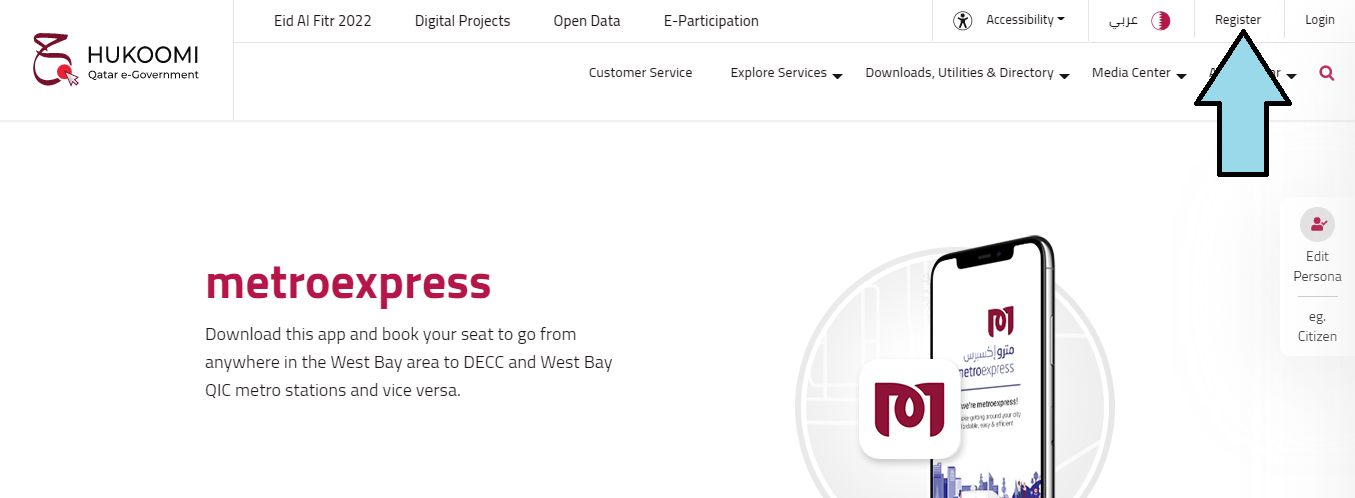
1. First, you need to open an Hukoomi Account. For this, you must have a Qatar ID and a Qatar mobile number. Visit Hukoomi- Qatar e-Government Portal to register yourself. On the right side at the top, you will find the option to register a new account.
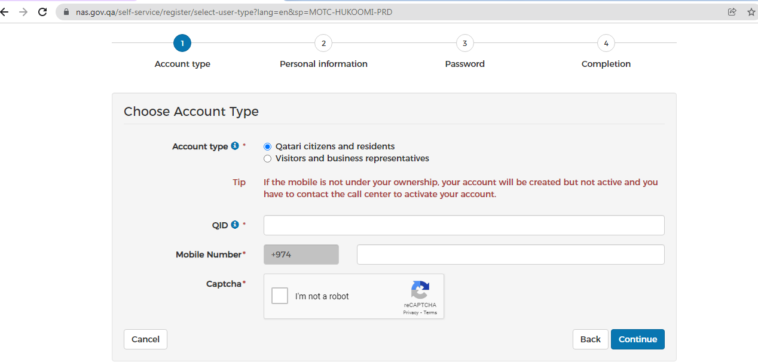
2. On the registration page, select the account type and provide the Qatar ID and mobile number. You need to verify the mobile number to activate your account.
3. Once you verify your mobile number, you will be redirected to the next page where you need to provide personal information.
🎯 Unlock Free Mock Test
Enter your email and select your exam category.
4. After providing the personal information, you need to set the login password and submit it.
Have questions about engineering careers in the Gulf? Ask here and get answers from experienced professionals
Provide necessary details and upload the documents:
Once your Hukoomi account is active, you need to upload your document by logging in to your account. Please follow the step-by-step process to do so.
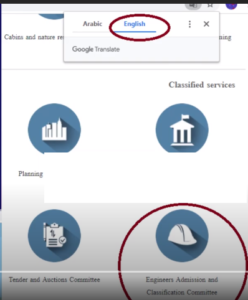
1. Choose language: After login, you are required to select a language( Arabic/English) and choose “Engineers Admission and classification Committee” as a classified service
2. Enroll for Engineers: Click registration & follow up of Applications(electronically) and then click Apply under admission committee Engineers services after that choose the Enrollment Engineers option and click next
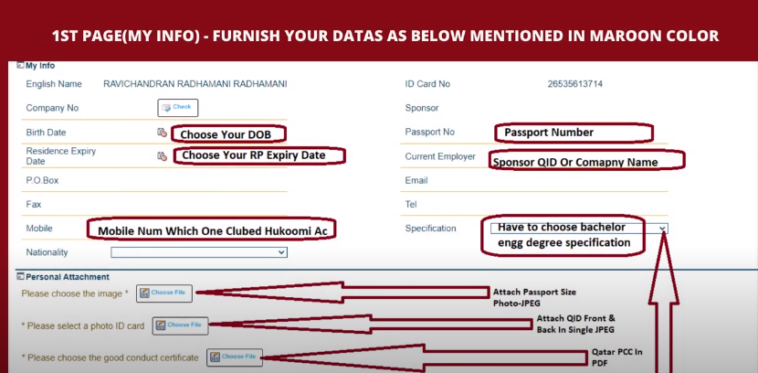
3. Personal Details: On the next page, you are required to provide the following details:
- Your name and ID card detail: Name and ID card details is automatically taken from your personal details, which you provide at the time of registration.
- Passport Detail: You need to provide your passport number.
- Current employer details: You are required to provide your sponsor QID or company name.
- Your DOB: Need to provide your date of birth as in your passport.
- Mobile number: required to provide a mobile number that is linked to your Hukoomi account.
- Your specification: Select your engineering degree specification.
Connect, share, and succeed: The Gulf Engineering Forum is your community for career support and expert insights
Required to upload the following documents under personal details:
- Passport-size photo
- QID front and back in a single JPEG
- Qatar PCC in PDF: A Police Clearance Certificate is an official document that is issued by the Criminal Evidence and Information Department (CEID), which is affiliated with the Ministry of Interior. If you have lived in Qatar for more than 6 months, you can apply for PCC. To get PCC, you need to fill out the PCC form and submit it with the necessary documents to the CEID office. You can download the PCC form Here
CEID OfficeTimings: Sunday to Thursday: 7:30 am to 1 pm.
There is also many consultancies and agencies which processes your PCC at affordable charges.
Documents required to be submitted along with the PCC Application form:
- Copy of the Passport
- Copy of the Qatar ID
- Copy of the fingerprinted document (Attested by the Qatar Embassy in the home country)
- 2 photographs (4 x 6 cm)
- Home Country PCC attested by the Ministry of Foreign Affairs in Qatar (MOFA)
- Letter from Company (if applicable)
- Date of First Entry and Last Exit (if applicable)
Once all the documents are submitted, it will take 7-10 days.
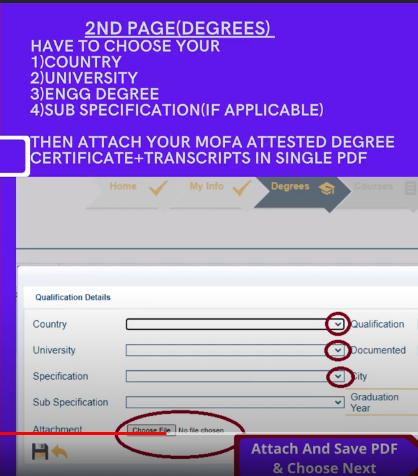
4. Degree: On the next page, select your university and submit your degree certificate and transcript. All Certificates must be attested by Competent Authorities in the Home Country and by the MOFA (Ministry of Foreign Affairs) in Qatar. For a degree certificate attestation by MOFA, you need to submit fide letter from your college/university
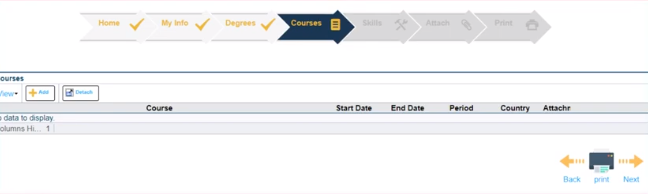
5. Courses: It is optional you add your training courses details and attach the course certificate.
6. Skill: It is also optional you add your work experiences with the date and attach your experience certificates.
For Experience within Qatar: Upload previous work experience if it is before the year 2014. Because MMUP will not consider experience certificates after 2014 if you were working in Qatar without an Engineer registration. For more than one company experience, it needs to be attested by the Chamber of Commerce and by the Ministry of Foreign Affairs in Qatar.
For Experience Outside Qatar: if you have work experience in another country, it requires to be attested by the relevant authorities of the respective countries and by the Ministry of Foreign Affairs in Qatar.
7. Attachment: On this page, you are required to upload the other documents like your CV, Passport front and back, and Transcript.
8. Generate Enrollment Forms: Click the final confirmation, and it will generate two enrollment forms. Print both enrollment forms and affix your photo to the generated enrollment form and sign where required.
9. Date of Submission: On successful submission, you will receive an SMS that provides the date to submit the document in the Baladiya office.
10. Collect Token: On the mentioned date, visit to Baladiya office with all original documents and enrollment forms. Collect your queue token from the machine for registration.
Baladiya office address: Doha Municipality Building, B Ring Road
11. Submit the Enrollment Form: Submit all necessary documents with the enrollment form on your turn. Within a month, you will receive an SMS for the exam date if everything is OK.
12. Exam: On the day of the exam, reach the Baladiya office on the 9th floor 30 mins before the exam time. The exam consists of 25 MCQs with a time limit of 1 hour.
After completing the exam within a few minutes result will be revealed. If you clear the exam, the UPDA ID card will be issued, and for this, you need to pay the 300 QAR fee.
Also Read: UPDA/MMUP Exam Syllabus and Pattern for Civil Engineer
How to renew your UPDA/MMUP Registration?
You can apply online for renewal one month before from date of expiration. Here is are stepwise guide for renewal
1. Go to the MME Website and log in to your account
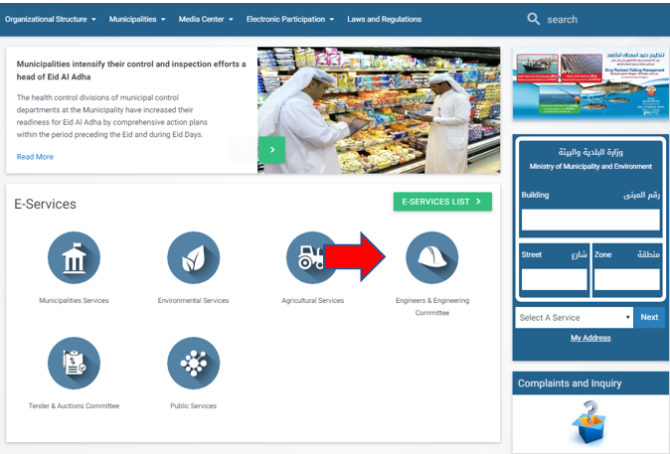
2. After login, select the “Engineer and Engineering Committee”
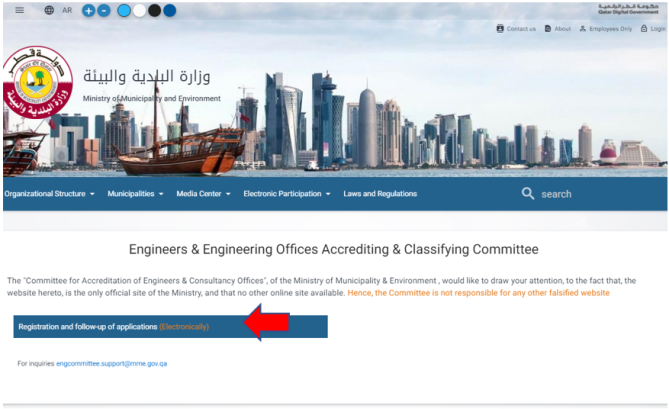
3. Click the Registration and Follow-up Applications
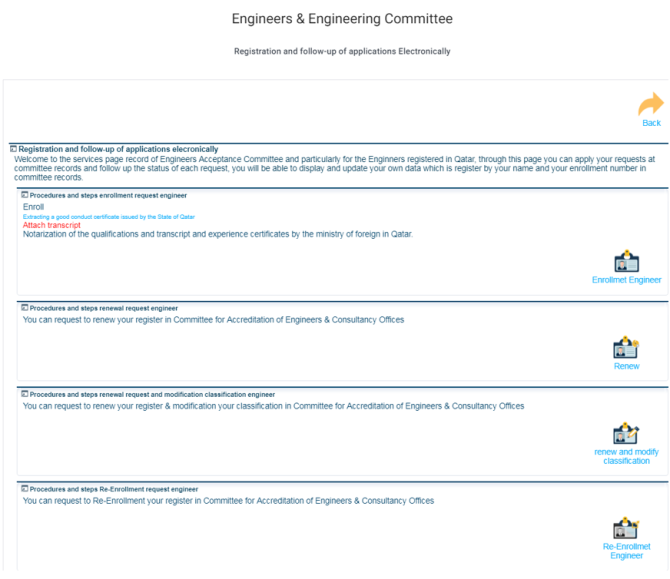
4. Click the Renew option
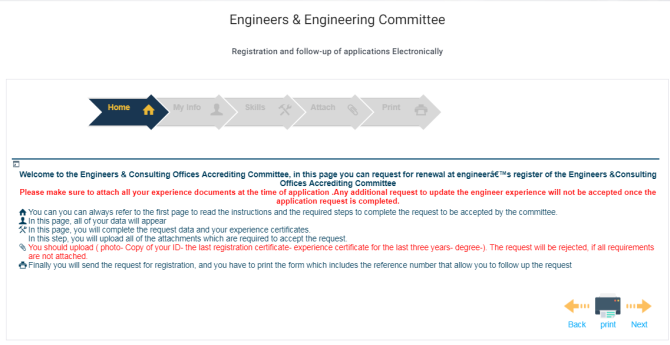
5. On the renewal page, click the next option
6. Complete My Info Page, Skills Page, and Attach Page
7. On the attachment page, you are required to upload the following documents
- Photo
- QID
- Last Engineer Registration Certificate or ID
- Experience Certificate for the previous 3 years
- Degree Certificates
8. Print the page. It consists of a reference number through which you can track your UPDA renewal status. On the last page, there is a reference number that you should keep for convenience in follow-up regarding your renewal.
9. After form submission, you will receive a confirmation message from BALADIYA
10. Visit the office to paythe 200 QAR fees to receive a new ID.
Also Read: UPDA/MMUP Exam Syllabus and Pattern for Civil Engineer